App Download Hub is an independent guide. We are not affiliated with any router manufacturer. For model-specific help, use your router maker’s support pages.
If you have ever tried to host a game server, reach a security camera from work, or run Plex from home and found that nothing outside your house can connect, port forwarding is almost certainly the missing piece. It is one of those settings that sounds far more technical than it is. Once you understand what your router is doing by default, the fix takes about five minutes.
What your router does with incoming traffic
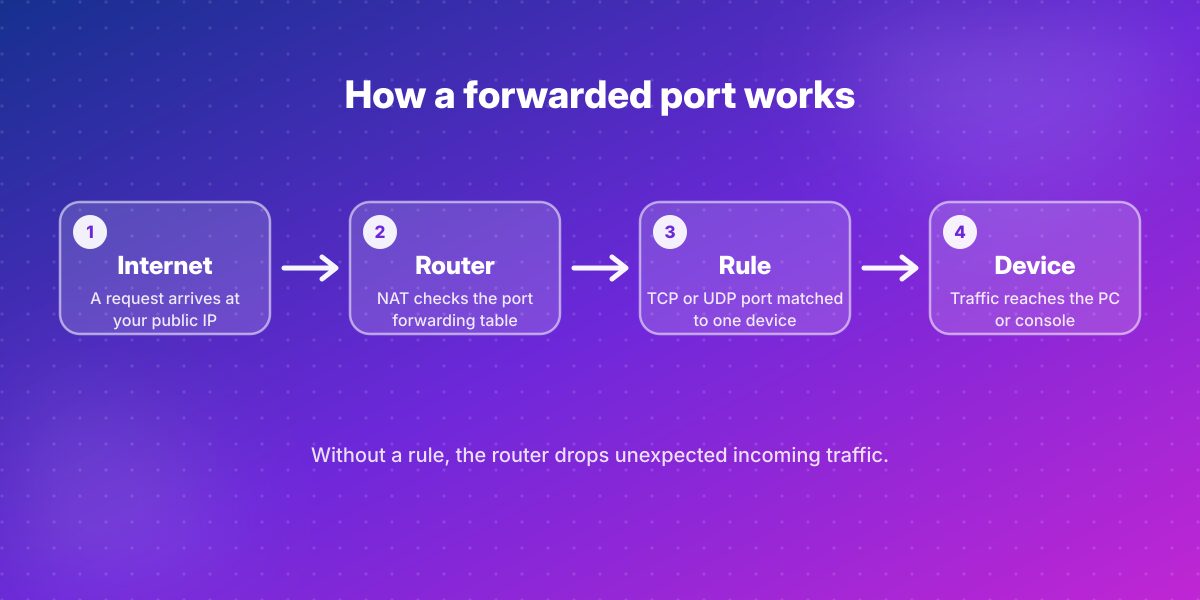
Your home has one public IP address, handed to you by your internet provider. Every device inside the house has a private address instead, usually something beginning 192.168 or 10.0. The router sits between the two and performs Network Address Translation, or NAT, keeping track of which internal device asked for what so that replies find their way back.
That works perfectly for traffic you start. You open a web page, the router notes the request, the reply comes back, and the router knows where to send it. Incoming traffic that nobody asked for is a different matter. The router has no record of it and no way of guessing which of your dozen devices it belongs to, so it drops the packet. That default is a genuine security feature, not an oversight.
A port forwarding rule is a standing exception. It tells the router that anything arriving on a particular port should always go to one particular device, no matter who sent it.
TCP and UDP, and which one you need
Every rule asks for a protocol, and the two choices are TCP and UDP. They are both ways of moving data, but they make opposite trade-offs.
TCP establishes a connection before sending anything, numbers every packet, and re-sends whatever goes missing. It is reliable and ordered, at the cost of a little delay. Web pages, file transfers, email, remote desktop and most database traffic use it.
UDP just sends. There is no handshake, no acknowledgement and no retransmission. If a packet is lost, it is lost. That sounds worse until you consider live voice or a fast-moving game, where a packet that arrives late is useless anyway and waiting for it would cause a stutter. Voice and video calls, most game traffic, DNS lookups and modern VPN protocols all use UDP.
The application decides, not you. Check its documentation. Minecraft’s Java edition uses TCP on port 25565, while the Bedrock edition uses UDP on 19132. Plex uses TCP on 32400. Remote Desktop uses TCP on 3389. If the documentation says the app needs both, most routers offer a combined TCP/UDP option, and selecting it creates one rule covering each.
Ports in brief
A port is a number from 0 to 65535 that lets one device run many services at once. They fall into three bands. Ports 0 to 1023 are the well-known ports, assigned to standard services such as 80 for HTTP and 443 for HTTPS. Ports 1024 to 49151 are registered to particular applications. Everything above that is ephemeral, used briefly for outgoing connections and then released.
Where you have a choice, pick something high and unusual rather than a default. Automated scanners sweep the internet looking for common ports, and an unusual number keeps you out of the easiest results.
What to gather before you open the router page
- The port number and protocol. From the app’s own documentation, not from memory.
- The local IP address of the device. On Windows, run
ipconfigand read the IPv4 Address line. On a Mac, it is under System Settings, Network, Details. On most consoles it appears in the network status screen. - A reserved address for that device. This matters more than people expect. Your router hands out addresses on a lease, and after a restart the device may come back with a different one, at which point your rule quietly points at nothing. Find DHCP Reservation or Address Reservation in the router settings and pin the device to a fixed address first.
Adding the rule
Menu names vary by manufacturer, but the shape is always the same. Sign in to the router, find the section called Port Forwarding, Virtual Server, or sometimes Apps and Gaming, and add a rule with a name you will recognise, the external port, the internal port, the protocol, and the internal IP address.
External and internal ports are usually the same number. Setting them differently is useful when two devices both want the same standard port: you can accept traffic on 8443 externally and send it to 443 internally, for example.
For brand-specific screens on Netgear and Linksys hardware, see our step-by-step port forwarding guide for those routers.
Port triggering, UPnP and DMZ are not the same thing
Three neighbouring settings get confused with port forwarding regularly.
Port triggering opens a port only after the device sends outgoing traffic on another port, then closes it again. It is more secure than a permanent rule and does not need a fixed IP, but it is no good for anything that must be reachable at any time.
UPnP lets applications request their own rules automatically. Convenient, but it means any program on your network, including malware, can open a path inward without asking you. Turning it off and forwarding deliberately is the safer habit.
DMZ forwards every port to one device. Treat it as a diagnostic tool, never a solution. A machine in the DMZ has no router protection at all.
Checking that it worked
Test from outside your network. A device on your own Wi-Fi often cannot reach your public IP, a quirk called NAT loopback, so a failed test from the sofa proves nothing. Use mobile data with Wi-Fi switched off, or an online port checking tool, and make sure the service is actually running while you test, because a closed port and a stopped application look identical from outside.
If it still fails, the most common cause in 2026 is CGNAT. Many providers now share one public address between many customers, which makes port forwarding impossible from your end. Compare the WAN address shown in your router with the address a “what is my IP” site reports. If they differ, you are behind CGNAT, and the fix is to ask your provider for a public IP address or use a relay service such as Tailscale or Cloudflare Tunnel instead. The other frequent culprit is double NAT, where an ISP modem and your own router are both routing; putting the ISP unit into bridge mode resolves it.
Keeping it safe
An open port is a permanent invitation, so treat every rule as a small risk you have chosen to accept. Forward the narrowest range you can rather than a wide block. Make sure the service behind the port has a strong password and current updates, because the port is only as secure as whatever is listening on it. Delete rules when you stop using them. Where your router supports restricting a rule to specific source addresses, use it. And for ongoing remote access to your own machines, a VPN or a mesh network such as Tailscale is a better answer than a forwarded port, because it exposes nothing to the open internet.
Common ports
- Minecraft Java 25565 TCP · Minecraft Bedrock 19132 UDP
- Plex 32400 TCP · Remote Desktop 3389 TCP
- SSH 22 TCP · FTP 21 TCP · HTTP/HTTPS 80 and 443 TCP
- WireGuard 51820 UDP · OpenVPN 1194 UDP
FAQ
Does port forwarding slow my internet down? No. It changes where packets are directed, not how fast they travel.
Should I pick TCP or UDP if I am not sure? Check the application’s documentation rather than guessing. Selecting both works but opens more than you need.
Why does my rule stop working every few weeks? Almost always because the device’s IP changed. Reserve the address in the router’s DHCP settings.
Is it safe? It is a managed risk. One carefully chosen port pointing at a patched, password-protected service is reasonable. A wide range pointing at an old device is not.
How do I know if my ISP has put me behind CGNAT? Compare the WAN address shown in your router with what a what-is-my-IP site reports. If they differ, you are sharing a public address with other customers and inbound port forwarding cannot work from your end.
What can I do if I am behind CGNAT? Ask your provider for a public IP address, which some supply free and others charge for, or use a relay such as Tailscale or Cloudflare Tunnel that works outward from your network and needs no inbound port at all.
Is it safer to forward a non-standard external port? Marginally. It keeps you out of the easiest automated scan results, but it is obscurity rather than security. The service behind the port still needs a strong password and current updates.
Why do some applications need both TCP and UDP? Because they use each for different things, typically TCP for control and login traffic and UDP for the fast-moving data. The application’s documentation will say, and most routers offer a combined option.
Should I delete rules I no longer use? Yes, and it is worth reviewing the list once a year. Forgotten rules pointing at devices that have changed or been retired are a common and entirely avoidable exposure.