App Download Hub is an independent guide. We are not affiliated with Comcast or Xfinity. For account-specific help, use Xfinity’s own support channels.
Xfinity has made the app the default route for setting up internet equipment. Whether you have been sent a new gateway, picked one up from a store, or bought your own modem to stop paying the monthly rental, the box will point you at the Xfinity app rather than a phone number or a web page. The process genuinely does take about ten minutes when it goes well. The trouble is that it fails in a couple of predictable ways, and the error messages do not tell you why.
Getting the app
The Xfinity app is free, and it is the one named simply Xfinity, published by Comcast. Search the App Store on an iPhone or iPad, or Google Play on Android, and install it. There are several Comcast apps with similar names — Xfinity Stream for television, and the older xFi app for network management — and the one you want for activation is the plain Xfinity app, which has absorbed what xFi used to do.
Sign in with your Xfinity ID, which is the email address, mobile number or username on the account, along with its password. If you have never set up an Xfinity ID, you can create one with the account number from your bill or from the card inside a self-install kit, plus the phone number on the account. Do this part before you unplug anything, while you still have a working internet connection.
Before you touch the app
Three things make the difference between a smooth activation and an hour of frustration.
- Have the account details to hand. Your Xfinity ID and password, and ideally the account number.
- Note the numbers on the modem. On the label you will find a MAC address, often printed as CM MAC or HFC MAC, and a serial number. If the app cannot find the device automatically, you will be asked to type these in, and reading them off the back of a box wedged behind furniture is a miserable job. Photograph the label before you install it.
- Use the right coax outlet. If you are replacing an existing modem, unplug the old one and use the same wall outlet. It is known to work. An unused outlet elsewhere in the house may not be connected to anything.
The step most people miss
Here is the part that trips up more activations than anything else. Your new modem has no internet service yet, because that is precisely what you are about to set up. If your phone is connected to its Wi-Fi, your phone has no internet either, and the app cannot reach Comcast’s servers to provision the line.
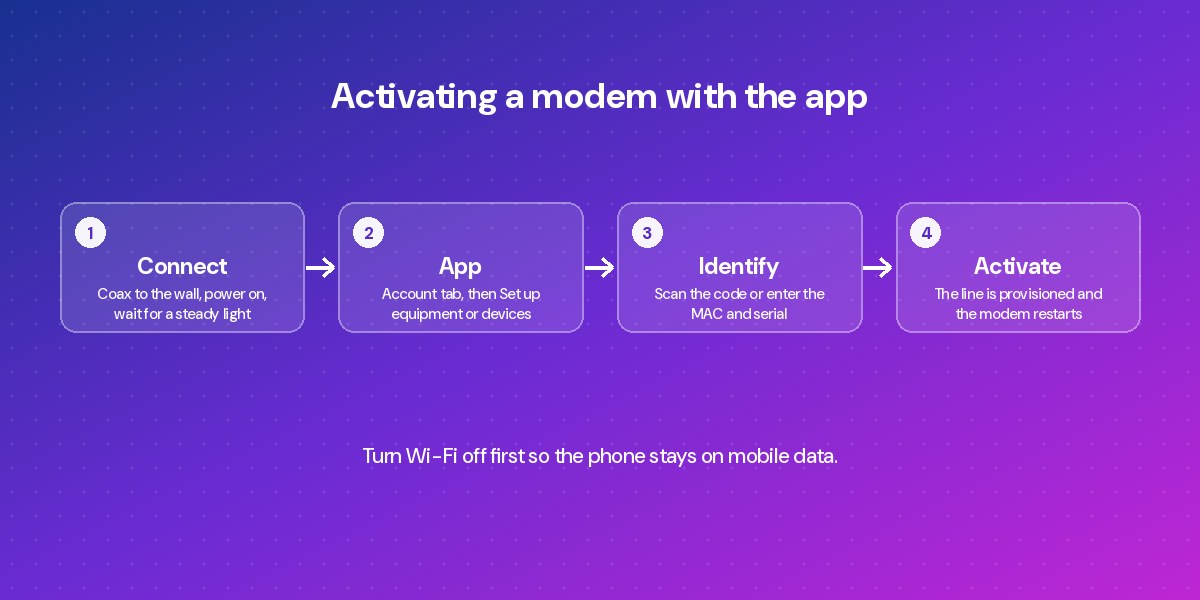
Turn Wi-Fi off on your phone and stay on cellular data for the whole activation. It feels backwards, and the instructions rarely spell it out, but the app needs a working connection to the outside world while the modem does not yet have one.
If you are setting up an Xfinity gateway rather than a plain modem, there is a variation: some steps ask you to join the gateway’s temporary Wi-Fi network, using the default name and password printed on its label, so the app can talk to the hardware directly. Follow whatever the app asks at that moment, but if it stalls while reporting that it cannot reach the network, switching back to cellular data is the first thing to try.
Running the activation
- Connect the hardware. Screw the coax cable into the wall outlet and into the modem, finger-tight and straight. Plug in the power. If you are using your own modem with a separate router, leave the router unplugged for now.
- Wait for the lights to settle. This takes several minutes and is not optional. The modem is searching for a signal and downloading its configuration. Wait until the lights stop flashing and sit steady. Starting the app early is the second most common cause of failure.
- Open the Xfinity app and go to the Account tab, at the bottom right.
- Scroll to Set up equipment or devices, then choose Xfinity Gateway or Modem under the Internet heading.
- Follow the guided steps. The app will try to detect the modem on your account. If it cannot, it will ask you to scan the code on the label or type in the MAC address and serial number.
- Let it finish. Activation takes a few minutes, during which the modem will restart at least once. Do not unplug anything while this happens.
- Set your Wi-Fi name and password if you are using an Xfinity gateway, then reconnect your devices. If you have your own router, plug it in now and set it up separately.
When the app says it cannot find a device
This message is unhelpfully generic. The usual explanations, roughly in order:
The modem has not finished starting. Give it a full ten minutes with the lights steady before trying again.
The phone is on the modem’s Wi-Fi. Covered above, and still the leading cause. Switch to cellular data.
The equipment is not on your account yet. Common with a modem bought from a store rather than supplied by Xfinity. The app may be looking for something it does not know exists, and the MAC address will need to be added manually.
The modem is not on the approved list. Xfinity publishes a list of customer-owned devices it supports. A modem that is not on it, or one that is DOCSIS 3.0 on a plan that now requires DOCSIS 3.1, will not activate however many times you try.
The coax outlet is dead. If the modem never gets a steady signal light, no amount of app work will help. Try the outlet the old modem used.
Activating without the app
The app is the easiest route, not the only one, which matters if your phone is too old to run it or you would rather not install anything.
In a browser. Connect a computer to the modem by Ethernet and open any web page. An unactivated modem usually redirects you to Comcast’s self-activation page, sometimes called the walled garden. Follow the prompts there with your account details ready. You can also go to xfinity.com/activate directly.
By phone. Comcast runs a self-install activation line on 1-855-652-3446. Have the MAC address and serial number from the modem label in front of you before you call.
If you are using your own router
A plain modem does only one job: it converts the cable signal into Ethernet. It has no Wi-Fi. Once the modem is activated, connect your own router’s WAN or Internet port to the modem’s Ethernet port, then set the router up on its own. Our guides to setting up an ASUS router and choosing a Wi-Fi 7 router cover what comes next.
Two things catch people out here. Power the modem up first and let it come fully online before plugging in the router, or the router may not pick up an address. And if you are swapping the router rather than the modem, the modem often needs a restart to recognize new hardware on its Ethernet port.
If you are specifically activating a Netgear modem on Xfinity, we have a model-specific walkthrough that covers the quirks of that combination.
Returning the old equipment
If you are replacing rented hardware, send the old unit back promptly. Comcast charges for unreturned equipment, and those charges appear weeks later when the connection between the two is no longer obvious. You can drop it at an Xfinity store or use a prepaid shipping label from your account. Keep the receipt or tracking number until a bill arrives showing the rental charge has stopped.
FAQ
Do I have to use the app? No. The browser route at xfinity.com/activate and the activation phone line both still work, though the app is the fastest when it cooperates.
Why does the app want me on cellular data? Because the modem has no internet service until activation finishes, so a phone connected to it cannot reach Comcast’s servers.
How long does activation take? Around ten minutes in total, most of it spent waiting for the modem lights to settle.
Can I activate a modem I bought myself? Yes, provided it is on Xfinity’s approved device list and new enough for your plan speed. You may need to add its MAC address to the account manually.
The lights never go steady. What now? That points at the cable signal rather than the activation. Check the coax is tight at both ends, try the outlet your old modem used, and contact Xfinity if it still will not lock on.
Related: Activating a Netgear modem on Xfinity · Best Wi-Fi 7 routers · Adding a network switch