App Download Hub is an independent guide. We are not affiliated with Verizon. For model-specific help, use Verizon’s own support pages.
If you rent your internet equipment from Verizon, sooner or later something will send you to your router’s settings page. Maybe you want to change the Wi-Fi password, open a port for a game, set up a guest network, or just find out why one room keeps dropping. Verizon prints a web address on the side of the box for exactly this, and on most Fios equipment that address is myfiosgateway.com. It looks like a website. It is not one, and that distinction explains almost every problem people run into with it.
What myfiosgateway.com actually is
It is a friendly name for your own router, nothing more. When you type it in, your Fios gateway answers the lookup itself and sends your browser to its own administration page, which sits on a private address inside your home, almost always 192.168.1.1. No request leaves your house. Nothing is checked against Verizon’s servers, and nothing about your account is involved.
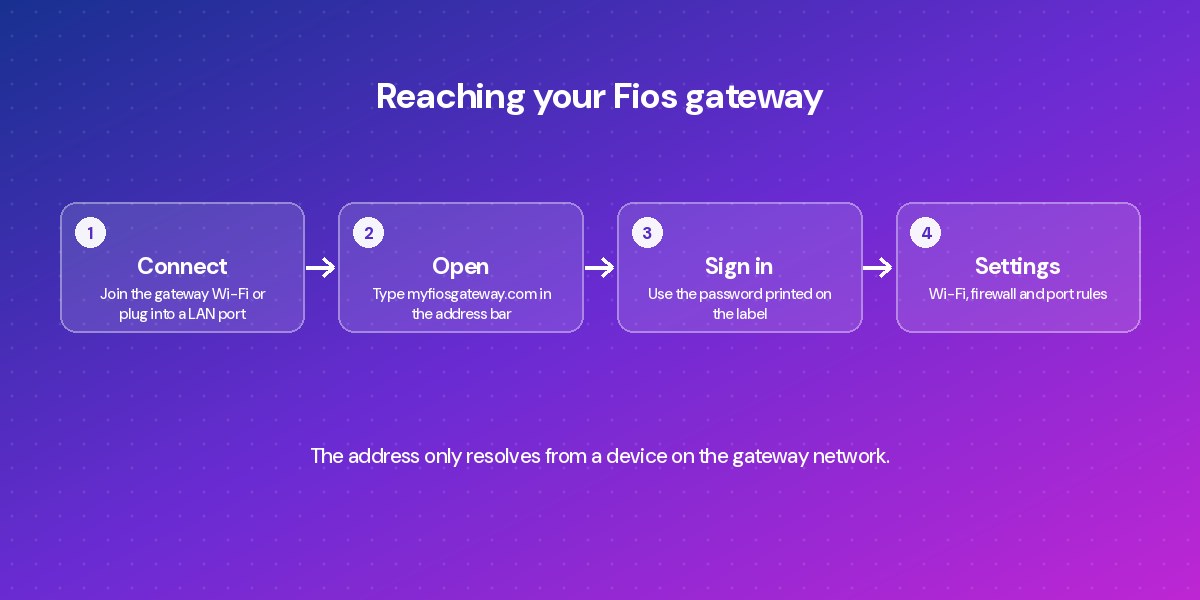
That is why the address behaves so strangely compared with an ordinary website. It only works while you are connected to that gateway. Try it on cellular data, from the office, or from a friend’s couch, and you will get a search results page or an error, because out there the name means nothing. This is also, incidentally, a security feature: your router’s settings page is not supposed to be reachable from the internet, and by default it is not.
Verizon has used several of these names over the years, which is where the confusion starts. If myfiosgateway.com does nothing on your equipment, the other name to try is mynetworksettings.com, which covers the newer and the in-between models. Both end up in the same place.
Which Verizon models use which address
The short version: check the label before you type anything. Verizon prints the correct administration address right on the sticker, and the sticker is always right for the box in front of you.
- Fios Quantum Gateway (G1100) · the older white tower. Uses myfiosgateway.com.
- Verizon Router (CR1000A and CR1000B) · the Wi-Fi 6E models. These answer to both myfiosgateway.com and mynetworksettings.com.
- Fios Router (G3100) · the Wi-Fi 6 tri-band model. Use mynetworksettings.com.
- CHR30A · a Wi-Fi access point that can act as your router. Use mynetworksettings.com.
- Older Actiontec MI424WR · long since replaced, but still in service in some homes. Use 192.168.1.1.
If none of the names work, 192.168.1.1 typed directly into the address bar will reach almost every Fios gateway, because that is the address the names point to anyway. A handful of Verizon business gateways use 192.168.0.1 instead. If you are not sure which address your own router uses, our guide on finding your router’s IP address walks through how to read it off your phone or PC in under a minute.
Signing in, step by step
- Get on the gateway’s own network. Join its Wi-Fi, or run an Ethernet cable from your laptop to one of the LAN ports on the back. A wired connection is worth the trouble if you plan to change wireless settings, because changing them will knock a Wi-Fi connection offline halfway through.
- Type the address, not a search. Put
myfiosgateway.comin the address bar and press Enter. Typing it into a search box will send you to articles about the address instead of to your router, which catches more people than you would think. - Enter the credentials from the label. If a username is requested, it is
admin. The password is the long string printed on the sticker. Verizon labels it differently depending on the model: on a G1100 and G3100 it is the Administrator password or Admin password, while CR1000A and CR1000B labels call it the Network Settings password. Either way, it is not your My Verizon account password, and it is not your Wi-Fi password. - Work through the first-run screens. A gateway that has never been configured will open a setup wizard rather than the normal dashboard. On some models you tap Continue first and the real login appears after that.
The certificate warning is expected
Browsers often show a privacy or security warning on the way in, with language about an invalid certificate. This alarms people, and it should not. Your router presents a certificate issued for itself, and no public certificate authority can vouch for a device sitting in your living room. The browser has no way to verify it, so it objects.
As long as you are on your own network and typed the address yourself, it is safe to choose Advanced and continue. If you would rather avoid the warning entirely, use https://192.168.1.1 or plain http://192.168.1.1, which some browsers handle more quietly.
When the page will not load at all
Work down this list in order, because the causes are roughly in order of how common they are.
You are not on the gateway’s network. By far the most frequent cause. Phones silently fall back to cellular data when Wi-Fi looks unreliable, and the request then goes out to the internet instead of to your router. Turn cellular data off for a moment and try again.
A VPN is running. A VPN tunnels your DNS lookups elsewhere, so the name cannot be resolved locally. Disconnect it, sign in, reconnect afterward.
You are connected to an extender. Fios Extenders such as the E3200 and CE1000A pass traffic through but do not always resolve the friendly name. Move closer to the main gateway, or use the numeric address.
Your browser is forcing HTTPS everywhere. Some privacy extensions and browser settings upgrade every request and refuse to fall back. Try a different browser, or a private window with extensions disabled.
Custom DNS is set on the device. If you have pointed your phone or PC at a public DNS resolver, local names may stop resolving. This is a common side effect of setting up DNS-based ad blocking. Switch back to automatic DNS temporarily.
When the password is rejected
If the page loads but the password bounces, the most likely explanation is that it was changed at some point, either by you, by someone else in the household, or through the My Verizon app, which can push a new password down to the router.
Check the My Verizon app first, since that is the one place a changed password may still be recorded. Failing that, a factory reset is the only route back in. Press and hold the small recessed reset button on the back of the gateway for about fifteen seconds, using a paperclip, until the lights cycle. Be clear about the cost of doing this: the gateway returns to the settings printed on the label, which means your Wi-Fi network name and password revert too, and every phone, TV, speaker, thermostat and printer in the house will need to be reconnected. Before you reset, write down anything you have customized, because none of it survives.
What you can actually change once you are in
The dashboard varies by model, but the settings people come looking for are consistent.
- Wi-Fi name and password. Under Wi-Fi settings. Changing these disconnects everything until each device is updated.
- Guest network. A separate network for visitors, and a sensible place for smart home gadgets you would rather keep away from your laptops.
- Wi-Fi 6E and the 6 GHz band. On the CR1000A and CR1000B the 6 GHz band is not switched on out of the box. If you own devices that support it, enabling it is worth doing.
- DHCP reservations. Pins a device to a fixed internal address. Do this before setting up any kind of remote access.
- Port forwarding. For game servers, cameras or a media server. Our explainer on port forwarding, TCP and UDP covers which protocol to pick.
- Firewall level and DMZ. Leave the firewall at its default. Before you touch the DMZ setting, read what DMZ actually does — it is far more exposing than most people assume.
- Connected devices. A live list of everything on the network, useful for spotting something you do not recognize.
Two habits worth adopting
First, change the administrator password away from the printed default, and keep it somewhere you will find it later. The label password is adequate, but anyone who has been in your home has had the chance to photograph the sticker.
Second, make a note of the current Wi-Fi name and password somewhere outside the router before you change anything. People reset gateways far more often than they expect to, and the five minutes it takes to write things down saves an evening of reconnecting devices.
FAQ
Is myfiosgateway.com a real website? No. It is a local name that only your own Fios gateway answers, and only from a device connected to it.
Why does it work on my laptop but not my phone? The phone has almost certainly dropped to cellular data, or has a VPN running. Turn both off and retry.
Is the admin password the same as my Wi-Fi password? No, and they are printed separately on the label. The admin password opens the settings; the Wi-Fi password connects devices.
Can I reach my router settings from outside the house? Not through this address, by design. Verizon’s My Verizon app handles remote management for the settings it supports.
Does resetting the gateway cancel my service? No. It only returns the equipment to its factory settings. Your account and your internet service are unaffected.
Related: mynetworksettings.com Verizon login · Find your router’s IP address · Port forwarding explained