App Download Hub is an independent guide. We are not affiliated with Verizon. For model-specific help, use Verizon’s own support pages.
Verizon has quietly changed the address you use to reach your own router. For years it was myfiosgateway.com, printed on the label of every Fios box. On newer equipment the label says mynetworksettings.com instead, and people who have had Fios for a while tend to find this out the hard way: they type the address they have always used, get a search results page, and assume something is broken. Nothing is broken. The name changed.
What the address does
mynetworksettings.com is a local shortcut to your router’s own settings page. When you type it, your router intercepts the lookup and answers with its own private address, nearly always 192.168.1.1. The request never leaves your house, Verizon’s servers are not involved, and your account is not consulted. It is a convenience so that you do not have to remember a string of numbers.
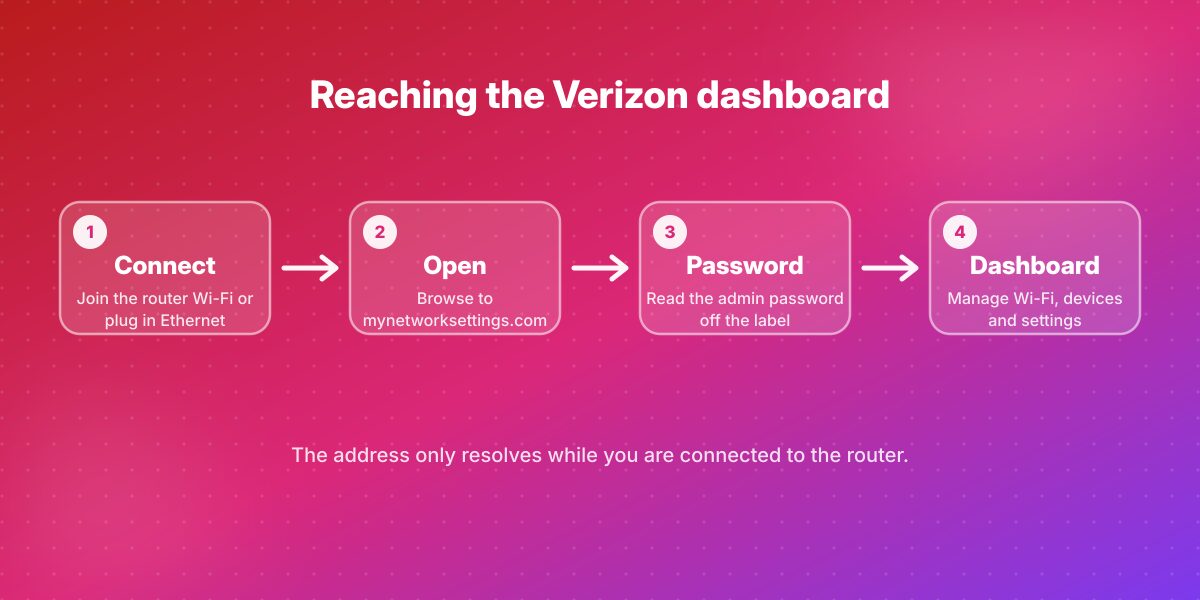
This local-only nature explains its quirks. The address works from your sofa and nowhere else. On cellular data, at work, or through a VPN it resolves to nothing, because outside your home the name has no meaning. That is intentional: a router settings page reachable from the open internet would be a serious liability.
Which models use mynetworksettings.com
Check the label on the equipment first. Verizon prints the correct administration address on the sticker, and the sticker always matches the box in front of you.
- Verizon Router (CR1000A and CR1000B) · the Wi-Fi 6E models. These accept both mynetworksettings.com and the older myfiosgateway.com.
- Fios Router (G3100) · the Wi-Fi 6 tri-band model. Use mynetworksettings.com.
- CHR30A · a Wi-Fi access point operating as your router. Use mynetworksettings.com. On this one the credentials may sit under a peel-off layer on the rear label.
- WNC-CR200A and ARC-XCI55AX · also reachable at 192.168.1.1.
- ASK-NCQ1338 and ASK-NCQ1338FA · these use 192.168.0.1 rather than 192.168.1.1.
- Fios Quantum Gateway (G1100) · the older model, which uses myfiosgateway.com instead.
If neither name does anything, type the numeric address directly. Our guide to finding your router’s IP address shows how to read it from a phone or PC if you are unsure which one applies.
Signing in
- Connect to the router itself. Join its Wi-Fi, or plug an Ethernet cable into one of the LAN ports. Wired is better if you intend to change wireless settings, since those changes will drop a Wi-Fi connection mid-save.
- Type the address in the address bar.
mynetworksettings.com, then Enter. Not into a search box, which will send you to articles about the address rather than to your router. - Enter the password from the label. On CR1000A and CR1000B the sticker calls it the Network Settings password. On the G3100 it is the Admin password. If a username field appears, it is
admin. This is not your My Verizon account password and not your Wi-Fi password, though all three may be printed near one another. - Expect an extra screen on first use. A router that has not been configured opens a setup wizard. On several models you select Continue, and the real login prompt follows.
About the certificate warning
Your browser will probably warn you that the connection is not private. This is normal here and is not a sign of anything sinister. Your router presents a certificate for itself, and no public certificate authority can vouch for a device inside your home, so the browser flags it.
If you typed the address yourself and you are on your own network, choosing Advanced and continuing is safe. Using https://192.168.1.1 or http://192.168.1.1 sometimes avoids the warning altogether.
When the page does not load
Check you are actually on the router’s network. This is the most common cause by a wide margin. Phones fall back to cellular data without announcing it, and the lookup then leaves your house. Turn cellular data off and try again.
Disconnect any VPN. A VPN sends DNS queries elsewhere, so a local name cannot resolve. Sign in first, reconnect after.
Move off the extender. Fios Extenders such as the E3200, CE1000A and CME1000 forward traffic but do not reliably answer the friendly name. Get closer to the main router or use the numeric address.
Try another browser. Extensions that force HTTPS on every request, and some strict privacy settings, will block a local page that cannot offer a trusted certificate. A private window with extensions off is a quick test.
Set DNS back to automatic. If you have pointed the device at a public resolver, perhaps while setting up DNS ad blocking, local names may stop working. Revert it temporarily.
When the password is rejected
A rejected password nearly always means it was changed at some point. The My Verizon app can set a new router password remotely, so check there before concluding it is lost.
If it really is gone, a factory reset is the only way back. Hold the recessed reset button on the back for roughly fifteen seconds with a paperclip until the lights cycle. Understand what that costs: everything returns to the printed defaults, including the Wi-Fi name and password, so every device in the house will need reconnecting. Note down your current settings first.
What to do once you are in
- Wi-Fi name and password. The most common reason people sign in. Changing them disconnects every device until each is updated.
- Guest network. Keeps visitors, and smart home gadgets, off the network your computers live on.
- The 6 GHz band. On CR1000A and CR1000B, Wi-Fi 6E is not enabled by default. Turn it on if you own devices that can use it.
- Security mode. Use WPA3, or WPA2/WPA3 mixed mode if older gear struggles. Our comparison of WPA2 and WPA3 explains the trade-off.
- DHCP reservations. Pin a device to a fixed internal address before setting up remote access of any kind.
- Port forwarding. For consoles, cameras and media servers. See port forwarding explained.
- Connected devices. A live inventory of what is on your network.
A note on the two names
There is no functional difference between the addresses on a router that accepts both. mynetworksettings.com is simply the newer branding, introduced as Verizon moved away from the Fios-specific name across a wider equipment range. If you have a mixed household, with an older gateway in one place and a newer router in another, it is worth writing the correct address on a sticky note and leaving it on each box.
The router page and the My Verizon app do different jobs
Verizon offers two ways to manage the same hardware, and they do not overlap neatly. Knowing which one to reach for saves a lot of hunting.
The My Verizon app signs in with your account, works from anywhere, and handles the settings most households touch: the Wi-Fi name and password, the guest network, parental controls on supported models, and a reboot button. Because it goes through Verizon’s servers, it can also change the router’s administrator password remotely, which is worth remembering if the one on the label stops working.
The router page at mynetworksettings.com works only from inside your home and exposes everything else: port forwarding, DHCP reservations, firewall levels, DNS servers, the DMZ setting, static routing, and the full list of connected devices with their addresses. Anything genuinely technical lives here and nowhere else.
In practice, if what you want is a new Wi-Fi password, use the app from the sofa. If you are opening a port for a game server or pinning a camera to a fixed address, you need the local page.
Worth doing while you are there
Change the administrator password away from the one printed on the label. The default is strong, but it is visible to anyone who has been in your home, and it is written on a sticker that is often photographed during setup and then forgotten in a camera roll.
Also note your Wi-Fi name and password somewhere outside the router. Resets happen more often than anyone plans for, and a written record turns a lost evening into a five-minute job.
FAQ
Is mynetworksettings.com replacing myfiosgateway.com? On newer equipment, yes. Routers such as the CR1000A accept both, so there is no rush to change habits if the old one still works for you.
Why does the address work on my laptop but not my phone? The phone has dropped to cellular data, or a VPN is running on it. Disable both and retry.
Is the Network Settings password the same as the Wi-Fi password? No. They are printed separately on the label and do different jobs.
Can I use this address from outside my home? No, by design. Use the My Verizon app for the remote settings Verizon supports.
The page loads but shows a setup wizard. Is something wrong? No. That is what an unconfigured router shows. Work through it, or select Continue if the option is offered.
Related: myfiosgateway.com explained · Find your router’s IP address · WPA2 vs WPA3