App Download Hub is an independent guide. We are not affiliated with any router manufacturer. For model-specific screens, use your router maker’s support pages.
DMZ is one of the few router settings that can meaningfully reduce your security, and it is usually offered one menu away from the settings that improve it. It also gets recommended constantly in forum posts as a quick fix for a game that will not connect or a camera that cannot be reached, with no mention of what it actually does. So it is worth being precise: a DMZ on a home router takes one device and removes the firewall from in front of it entirely.
What DMZ means on a home router
The term is borrowed from corporate networking, where a DMZ is a genuinely separate network segment. Public-facing servers sit in it, isolated by firewall rules both from the internet and from the internal network, so that a compromised web server cannot reach the accounts database behind it. That isolation is the entire point.
A home router does nothing of the sort. What it calls a DMZ is a DMZ host: a single device on your ordinary home network that receives every inbound connection the router does not have another rule for. There is no separate segment, no isolation, and no extra monitoring. The device stays on the same network as your laptops and phones, and it can still reach all of them.
Some manufacturers are more honest about this in their naming, calling it an Exposed Host or Default Server. Those are better descriptions of what it is.
How it works mechanically
Your home has one public IP address. Every device inside has a private address, and the router translates between them using NAT. When traffic you did not ask for arrives from the internet, the router has no record of who it belongs to, so it drops it. That default is a security feature.
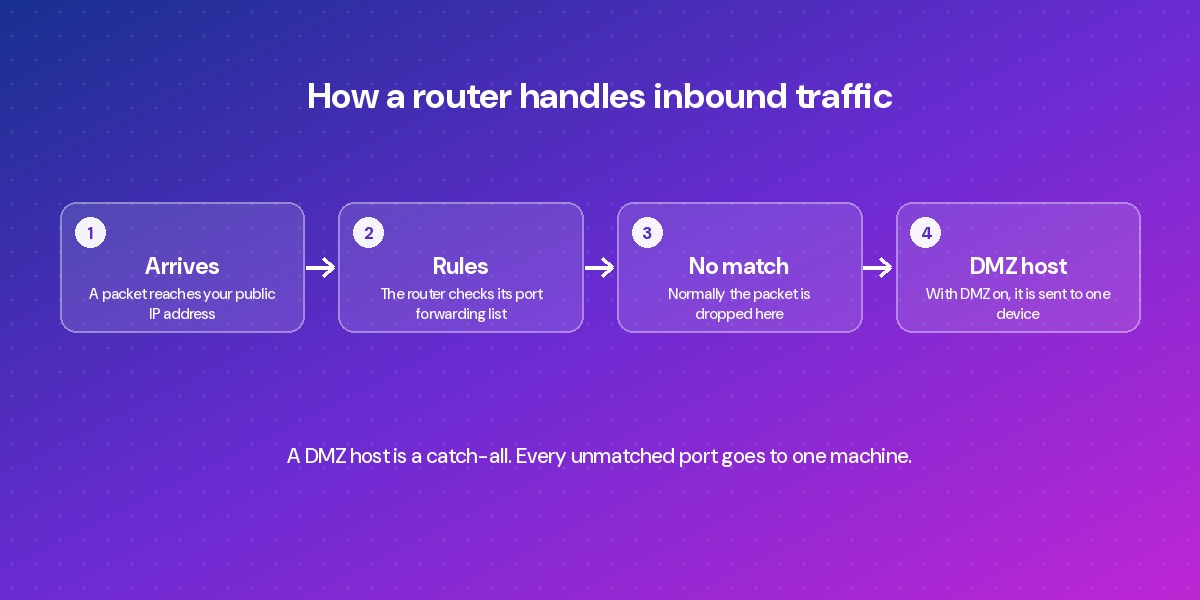
Rules change that. When a packet arrives, the router checks its port forwarding list first. If a rule matches the port, the packet goes to the device that rule names. If nothing matches, the packet is normally discarded.
Enabling a DMZ host inserts a catch-all at the end: anything that did not match a specific rule gets sent to the DMZ device instead of being dropped. That is all it is, and it explains two things people find confusing. Existing port forwarding rules still take priority, so they keep working. And “all ports” really does mean all of them — every TCP and UDP port on that device becomes reachable from the internet, including ones you have no idea are listening.
Why that is riskier than it sounds
Most people picture the DMZ as opening the ports their game needs. In practice it opens everything on the machine: file sharing, remote desktop, printer services, database ports left behind by software you installed once, management interfaces on devices that were never meant to face the internet.
Automated scanners sweep the entire public address space continuously, looking for exactly these. They are not targeting you; they are targeting every address, all the time. A device in the DMZ will start receiving probes within minutes.
And because a home DMZ provides no isolation, a compromised machine is sitting on the same network as everything else you own. The attacker does not have to get through the router again — they are already inside it. That is the fundamental difference between a home DMZ and the corporate concept it borrowed its name from.
How to configure a DMZ host, if you must
If you have decided it is justified, do it properly rather than quickly.
- Reserve a fixed address for the device first. In the router settings, find DHCP Reservation or Address Reservation and pin the device to a fixed internal address. Skip this and a reboot will eventually hand that address to something else — and your DMZ rule will then expose whatever happens to be holding it. This is not a theoretical risk; it is the most common way DMZ setups go wrong.
- Find the setting. It is usually under Advanced, Firewall, NAT Forwarding, WAN, or Security. Netgear puts the Default DMZ Server under WAN Setup. TP-Link has DMZ under NAT Forwarding. Linksys lists it under Security or Apps and Gaming. Verizon and most ISP gateways keep it under Firewall settings.
- Enable it and enter the reserved address. Save, and the router will usually apply it without a restart.
- Harden the device immediately. Strong unique password on every account, automatic updates on, and everything you are not using switched off — file sharing, remote desktop, printer sharing, UPnP media services.
- Set yourself a reminder to turn it off. If you enabled it to diagnose something, it should not still be on next month. Most DMZ hosts left running were enabled for a ten-minute test years earlier.
Port forwarding is almost always the better answer
The honest summary is that nearly every reason people reach for DMZ is better served by port forwarding. A forwarding rule opens one specific port to one specific device, leaving the firewall in place for everything else. If a game needs three ports, open three ports. The work is marginally greater; the exposure is dramatically smaller.
Our guide to port forwarding, TCP and UDP explained covers how to find which ports an application needs and which protocol to choose, and we have a walkthrough for the Netgear and Linksys screens specifically.
The one scenario where a DMZ is genuinely defensible is diagnosis. If something will not connect and you cannot establish which ports it needs, putting it in the DMZ briefly tells you whether ports are the problem at all. If it works in the DMZ, the issue is a missing rule and you can go and find the right ports. If it still does not work, the problem is elsewhere — and you have saved yourself an afternoon of guessing. Either way, switch the DMZ off as soon as you have your answer.
Alternatives worth knowing
Port triggering opens a port only after the device sends outbound traffic on a related port, then closes it again. More secure than a standing rule, but no good for anything that must be reachable at any time.
UPnP lets applications request their own rules automatically. More convenient and considerably less exposing than a DMZ, but it means any program on your network, malware included, can open a path inward without asking. Preferable to a DMZ; still worse than deliberate rules.
A VPN or mesh network such as Tailscale or WireGuard is the right answer for reaching your own machines from elsewhere. It exposes nothing to the open internet and removes the question entirely. For most people wanting remote access to a home server, this is the correct choice rather than any inbound rule at all.
Cloudflare Tunnel or a similar relay publishes a specific service without opening any inbound port, which also works when your ISP has put you behind CGNAT and port forwarding is impossible from your end.
Double NAT, and the one legitimate everyday use
There is a common situation where DMZ is used sensibly. If your ISP supplies a modem-router combination and you have added your own router behind it, you have two devices doing NAT. That double NAT breaks port forwarding, because rules on your own router sit behind the ISP box that nothing has told about them.
The clean fix is to put the ISP unit into bridge mode, so it stops routing and your router handles everything. If your ISP does not allow bridge mode, pointing the ISP box’s DMZ at your own router’s WAN address is the accepted workaround. This is safer than it sounds, because the thing you are exposing is a router with its own firewall, not a PC. Your own router then handles inbound traffic normally with its own rules.
FAQ
Is DMZ the same as port forwarding? No. Port forwarding opens specific ports to a device. DMZ sends every unmatched port to it, with no firewall in between.
Will DMZ make my connection faster? No. It changes which packets are allowed through, not how fast they travel. Any improvement you notice is a connection that was being blocked now working, not extra speed.
Is it safe for a games console? Safer than for a PC, since consoles run less and are harder to attack, but open NAT settings or specific port rules achieve the same result with far less exposure.
Do my port forwarding rules still work with DMZ on? Yes. Specific rules are checked first; the DMZ only catches what is left over.
Can I put more than one device in the DMZ? No. A home router supports a single DMZ host, because it is a catch-all destination rather than a network segment.
Related: Port forwarding explained · Port forwarding on Netgear and Linksys · WPA2 vs WPA3