App Download Hub is an independent guide. We are not affiliated with NordVPN. Check NordVPN’s own tutorials for the exact steps for your router model.
Running a VPN on your router protects everything behind it, including the devices that cannot run VPN software themselves: smart TVs, games consoles, streaming sticks and anything else on the network. It also uses only one of your subscription’s device slots no matter how many things connect. The catch is that it is more involved than installing an app, and not every router can do it.
What you gain, and what you give up
On the plus side, coverage is automatic and complete. Nothing on the network can forget to connect, and the router counts as a single device against the ten that NordVPN allows.
Against that, you lose the convenience of the app. Switching countries means logging into the router rather than tapping a button. The kill switch, threat protection and other app features are not available. Speed drops, often sharply, because the router’s processor has to encrypt every packet. And everything behind the router shares one exit location, which is a nuisance when one person wants a local connection for banking and another wants a foreign one for streaming.
Check your router first
This is the step that decides whether the rest is possible. NordVPN does not publish firmware; it relies on your router having a built-in VPN client. Routers that generally do include ASUS models running AsusWRT or Merlin firmware, GL.iNet travel and home routers, anything running OpenWrt, DD-WRT or Tomato, Keenetic, Cudy, Netduma, Peplink and Pepwave, Ubiquiti EdgeRouter, MikroTik, and firewall platforms such as pfSense and OPNsense.
Routers that generally cannot include most units supplied by internet providers, standard Netgear and Linksys consumer models on stock firmware, and most mesh systems including Google Nest Wifi and Amazon eero.
Look for a section named VPN Client, OpenVPN Client or WireGuard in your router’s admin page. A VPN server setting is a different feature, for connecting into your home from outside, and will not help here.
If your router cannot do it, the usual workaround is a small dedicated VPN router such as a GL.iNet unit placed behind your existing one, creating a second network that is routed through the VPN while the main network stays direct. It also neatly solves the problem of wanting both options at once.
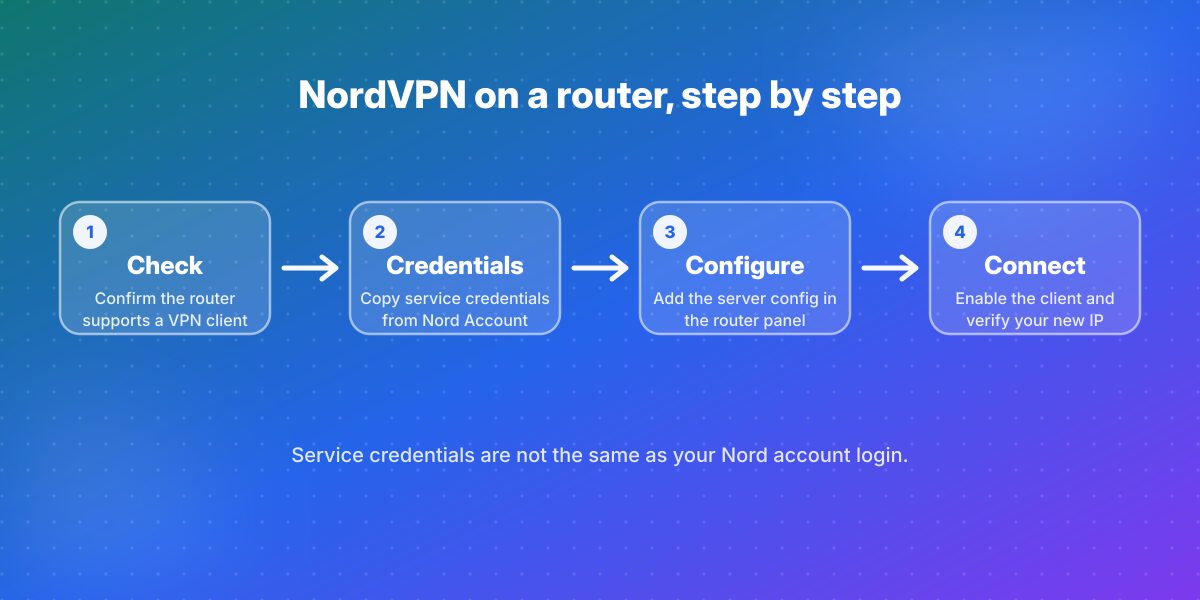
Step 1: Get your service credentials
This trips up almost everyone. Your router does not use the email address and password you use to sign in to NordVPN. It uses a separate pair called service credentials.
Sign in to the Nord Account dashboard in a browser, open the NordVPN section, find Manual setup, and look for service credentials. You will be shown a username and password that look like random strings. Copy both.
Step 2: Pick a server
From the same manual setup area you can download OpenVPN configuration files for individual servers, or copy the hostname of the server you want.
Choose a server close to you unless you have a specific reason not to, because distance costs speed. Decide between UDP and TCP while you are there: UDP is faster and the right default, TCP is slower but copes better on unreliable connections and is harder for restrictive networks to block.
Note that NordLynx, NordVPN’s fast WireGuard-based protocol, is tied to its own apps. On routers you will usually be using OpenVPN, which is slower. Some platforms, notably GL.iNet and OpenWrt, can run WireGuard configurations and get closer to NordLynx speeds.
Step 3: Configure the router
The exact screens differ, but the pattern is consistent.
- Sign in to the router’s admin page.
- Find VPN, then VPN Client, and add a new profile.
- Choose OpenVPN as the type and upload the configuration file you downloaded, or enter the server address manually.
- Enter the service credentials as the username and password.
- Enable the option to start the client automatically, and the kill switch or block-if-disconnected setting if your firmware offers one.
- Save and apply.
On ASUS routers this sits under VPN, VPN Client, Add Profile, OpenVPN. On GL.iNet it is VPN, OpenVPN Client. On OpenWrt it is usually done through the LuCI interface or NordVPN’s own lightweight package.
Step 4: Verify
Do not trust the router’s status indicator alone. Open a browser on a device connected to that network and search for “what is my IP”. The address and country shown should be the VPN server’s, not your own. Run a DNS leak test as well: if your provider’s name appears, DNS requests are escaping the tunnel, and setting the router’s DNS to NordVPN’s resolvers usually fixes it.
Speed, realistically
Encryption is processor-intensive, and consumer routers have modest processors. An older router may manage only ten to fifty megabits per second through an OpenVPN tunnel regardless of how fast your line is. A current mid-range ASUS might reach one or two hundred. A gigabit connection will not survive intact on most home hardware.
If speed matters, look for a router with hardware AES acceleration, use UDP rather than TCP, pick a nearby server, and use WireGuard where your firmware supports it. Many people settle on selective routing instead, sending only chosen devices through the VPN while everything else goes direct. ASUS calls this VPN Director; OpenWrt handles it with policy-based routing.
Troubleshooting
If the client will not connect, the cause is nearly always the credentials: confirm you used the service credentials rather than your account login. After that, check the router’s clock, since certificate validation fails when the time is wrong, and try a different server in case the one you picked is down.
If the connection drops repeatedly, switch from UDP to TCP. If local devices such as printers become unreachable, the VPN is capturing traffic meant to stay on the network, which selective routing resolves. If a streaming service complains, that is the service detecting a VPN rather than a fault in your setup.
FAQ
Does a router VPN use more than one device slot? No, it counts as one.
Can I still use the NordVPN app on my phone? Yes, though connecting through both at once doubles the encryption and slows things further.
Will this work on my ISP’s router? Usually not. Most provider-supplied units have no VPN client.
Is NordLynx available on routers? Not directly. Some platforms accept WireGuard configurations, which is the closest equivalent.
Will every device lose access to local services? Devices behind the VPN can usually still reach printers and network storage on the same LAN, but anything that checks your location, including some streaming apps and banking sites, will behave as though you are elsewhere.
Can I exclude certain devices from the VPN? On routers that support policy-based routing, including many ASUS models and most firmware with split tunnelling, yes. On a basic router the VPN usually applies to everything or nothing.
Why is my speed lower through the router VPN? Encryption is handled by the router’s processor, which is far weaker than a phone or laptop. A router not built for VPN throughput will cap well below your plan speed regardless of the server you choose.
Does a router VPN protect devices that cannot run VPN apps? Yes, and that is its main advantage. Smart TVs, consoles and smart home gear get the same tunnel without any software of their own.
What happens if the VPN connection drops? Behavior depends on the router. Some fall back to the normal connection, exposing traffic you expected to be tunnelled. Check whether a kill switch is available and enable it if so.
Is it better to run the VPN on the router or on each device? Per-device apps are faster, easier to switch off and usually offer more features. The router approach is right when you want coverage for hardware that cannot run an app at all, and the two can be combined.